

generative AI tools for developers in 2026 boost productivity with real results
Overview
Introduction
Let’s be honest: keeping up with generative AI tools in 2026 feels like drinking from a firehose. New tools, platforms, and updates drop every week. By 2026, over 84% of developers use AI tools in some part of their workflow, according to the Top 100 Developer Productivity Statistics with AI Coding Tools report. But more tools doesn’t always mean more productivity.
The real challenge is tool overload. Developers and teams waste time jumping between options, never quite sure which ones actually move the needle. That’s where this guide comes in.
We cut through the noise. Our focus is on the generative AI tools that genuinely boost productivity, not the flashy ones that just add clutter. Whether you’re a software developer engineer, a custom software developer, or part of a team exploring superhuman AI workflows, you’ll find practical, actionable insights here.
If you’re still figuring out which tools to try first, check out our deeper look at how developers are adopting and choosing what works. It’s a great companion read.
The rest of this guide walks you through the most effective generative AI tools, real-world use cases, and smart AI training strategies to keep your team ahead in 2026. No fluff, just what works.
Ready to stay informed about the fast-changing AI landscape? Get clear, daily updates delivered straight to your inbox with The AI Newsletter Worth Reading.
The Productivity Promise: How Generative AI is Changing Software Development
There is no doubt generative AI tools are reshaping how we build software. By 2026, 84% of developers use AI tools every day, and nearly 9 in 10 who use them save at least one hour per week according to the AI Coding Assistant Statistics 2026 report. But here is the catch: only 29% of developers trust AI outputs to be accurate. That trust gap is huge and it changes how we think about productivity.
The time-savings numbers sound amazing at first. Some studies show developers complete tasks up to 55% faster with tools like GitHub Copilot. Others report productivity gains of 25 to 39 percent. But not every claim holds up under real scrutiny. A 2026 study found that developers using AI were actually 19% slower to reach a verified correct solution, even though they felt 20% faster. That gap between perception and reality matters.
So what is really happening? Generative AI shines at certain tasks: writing boilerplate code, generating unit tests, refactoring old functions, and automating documentation.
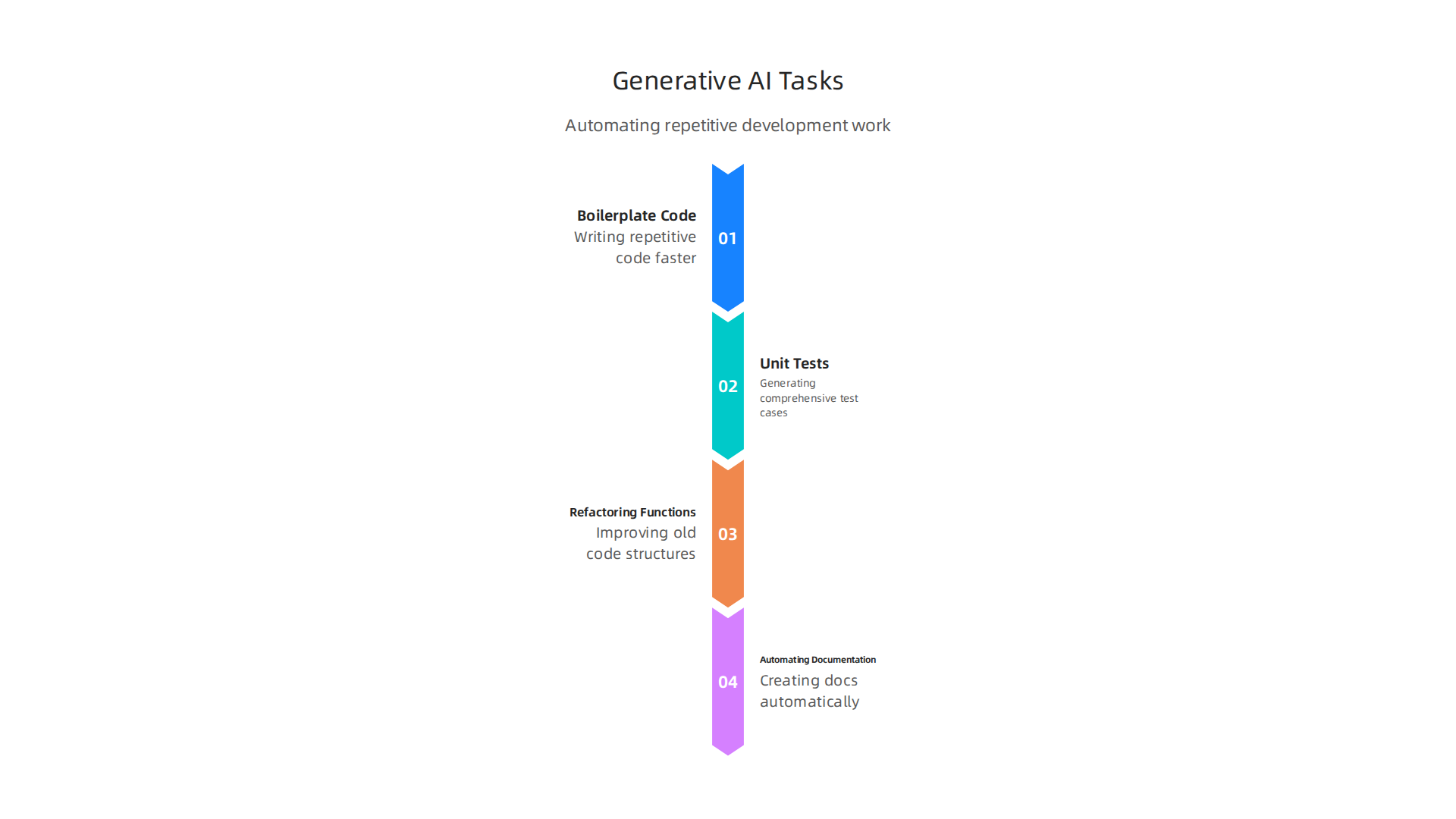
These are the repetitive jobs that eat up hours every week. Developers save serious time there. But AI still struggles with complex logic, tricky edge cases, and security-sensitive code. That is why expert human review stays essential.
The teams that see the biggest wins measure their results carefully. They do not just count lines of code written.

They look at lead time, code quality, and actual return on investment. Lower performing teams using AI improved their delivery speed by nearly 50% compared to similar teams not using AI, according to the 2026 Engineering Productivity Benchmarks report. Top teams saw smaller gains around 10 to 15 percent, but those teams were already running fast.
The lesson is clear: generative AI tools offer real productivity potential, but only when you track the right metrics. Tools alone do not make a team superhuman. Smart workflows, honest measurement, and skilled human oversight do. If you want to understand which tools actually deliver measurable improvements for your team, reading about AI productivity tools for developers deliver measurable ROI is a good next step.
Evaluating Top Generative AI Tools for Code Generation in 2026
So which generative ai tools actually deliver on the productivity promise? By 2026, several code assistants have emerged as clear leaders. Each has different strengths, so the right choice depends on your stack and workflow.
Here is a quick look at the top contenders:
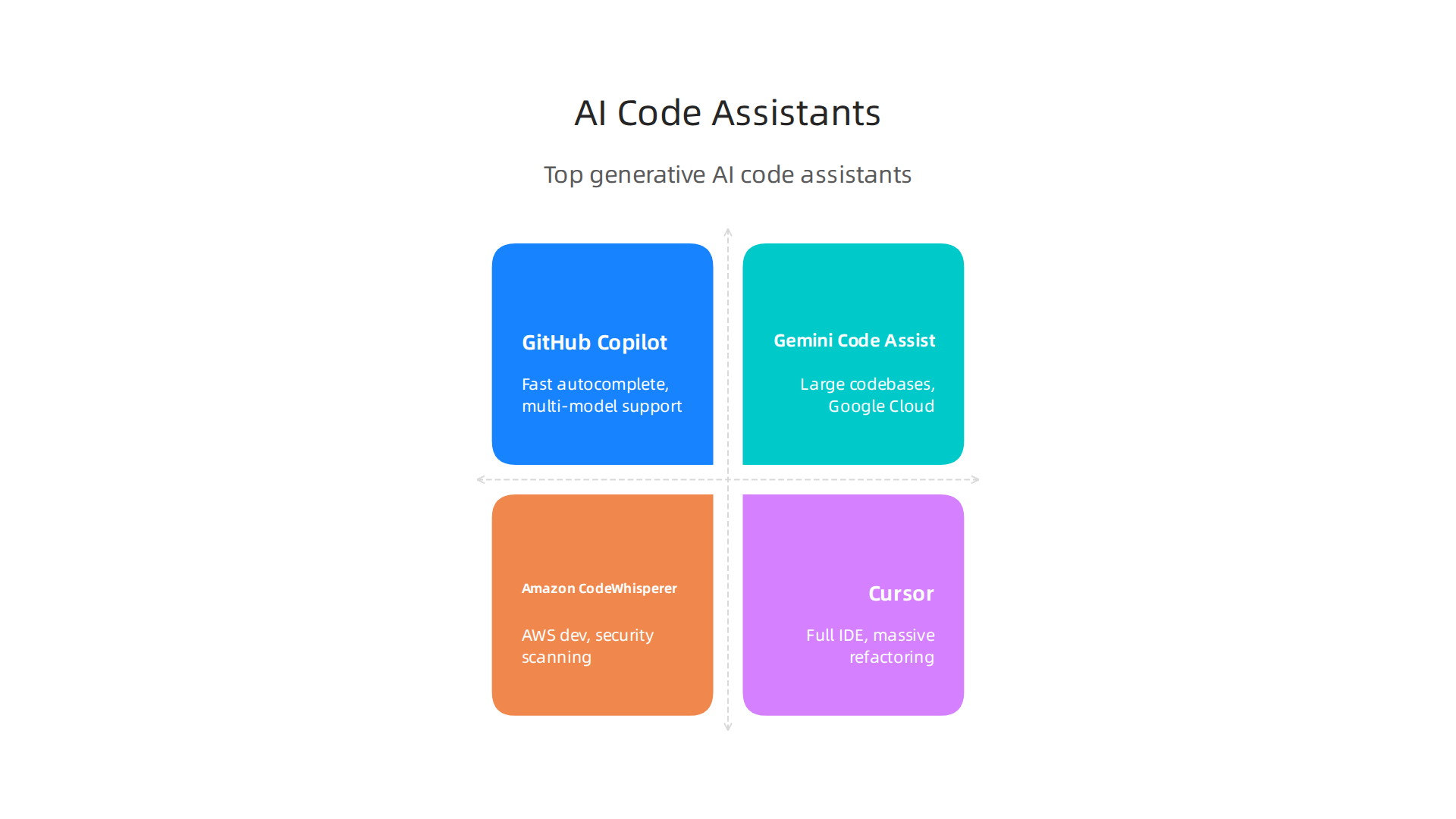
| Tool | Context Window | Starting Price | Best For |
|---|---|---|---|
| GitHub Copilot | 128,000 tokens | $10/month | Fast autocomplete, multi-model support |
| Gemini Code Assist | 1,000,000 tokens | Free / $19/month | Understanding large codebases, Google Cloud |
| Amazon CodeWhisperer (Q Developer) | 4,000 characters (Pro) | Free / $19/month | AWS development, security scanning |
| Cursor | Depends on model | $20/month | Full IDE experience, massive refactoring |
GitHub Copilot remains the industry standard according to the Best AI Coding Assistants 2026 review. It suggests completions in real time and works across many editors. Its free tier gives 2,000 completions per month.
Gemini Code Assist offers the largest context window available. As the GitHub Copilot vs Gemini Code Assist comparison shows, it scores higher on SWE-bench benchmarks and provides detailed reasoning. This makes it a strong choice for custom software developers working on complex projects.
Amazon CodeWhisperer (now Amazon Q Developer) is a solid pick for teams already in the AWS ecosystem. The full comparison of all code assistants highlights its built-in security vulnerability scanning, which adds a layer of safety.
For software developer engineer roles that involve heavy refactoring, tools like Cursor provide a complete IDE built around AI. The Best AI for Coding in 2026 guide notes that Cursor excels at agent-based coding and large-scale changes.
The key is matching the tool to your specific needs. Before you pick one, think about where you code most, which languages you use, and what kind of ai training your team needs. If you want a deeper look at how to choose, this guide on selecting AI software development tools for your 2026 team breaks down the decision process.
And if you want to stay current on new tools as they launch, getting clear daily AI updates from The AI Newsletter Worth Reading can help you keep pace with the fast-changing landscape.
Seamless Integration: Adding AI to IDEs and CI/CD Pipelines
Once you have chosen a generative AI tool, the real work begins: making it a natural part of your daily workflow.

The best code assistant is useless if it does not fit into your existing environment. In 2026, every major tool offers plugins for popular IDEs like VS Code and JetBrains. The Amazon CodeWhisperer vs. Gemini Code Assist vs. GitHub Copilot comparison shows that all three support VS Code and JetBrains IDEs, but the experience differs slightly. Copilot feels like a natural extension of your editor, while Gemini offers deeper context awareness for large projects. Amazon CodeWhisperer shines for teams already using AWS tools.
For software developer engineer roles, plugging AI into your IDE is just the start. The real productivity gains come from adding AI to your CI/CD pipeline. Imagine automated code reviews that flag potential bugs before a human reviewer ever sees the code. Or AI agents that generate test cases and run them against every pull request. Tools like Gemini Code Assist now offer AI-powered pull request reviews directly inside your workflow. Others integrate with GitHub Actions or Jenkins to suggest deployment improvements and catch security issues early.
Getting started is straightforward. Most tools provide a plugin for VS Code or JetBrains that you install in seconds. For CI/CD, you typically add a step to your pipeline YAML file that calls the AI tool’s API. For example, you can configure GitHub Copilot to review code in your pull requests, or use Amazon CodeWhisperer’s security scanning as a build step.
Custom software developers often build their own wrappers around these APIs. The key is to start small: enable autocomplete in your IDE first, then add CI checks one at a time. Over time, AI becomes a seamless part of how your team builds and ships software.
For a deeper look at integrating AI into your broader development stack, check out this guide on enterprise AI platforms compared. It covers how to connect these tools with cloud services and infrastructure.
Mastering Prompt Engineering for Better Code Output
You just installed a powerful AI assistant in your IDE. You type your first request: "Write a function to sort a list." The AI spits out something generic. It works, but it does not match your code style, and it misses edge cases. Sound familiar? Here is the truth: the quality of what you get from generative AI tools depends almost entirely on the quality of what you give them.
Prompt engineering is the skill of writing clear, structured requests that guide the model toward useful output. And it pays off. One study found that using best-practice prompt structures can improve code precision by up to 45 percent and reduce runtime bugs by 60 percent. That is a huge difference for just a few extra seconds of thought.
So what makes a good prompt for code? Start by setting a role. Tell the AI: "Act as a senior Python developer who values readability and type hints." Then provide context. Paste in your function signature, the relevant data structure, or a link to your style guide. Next, define the output format.
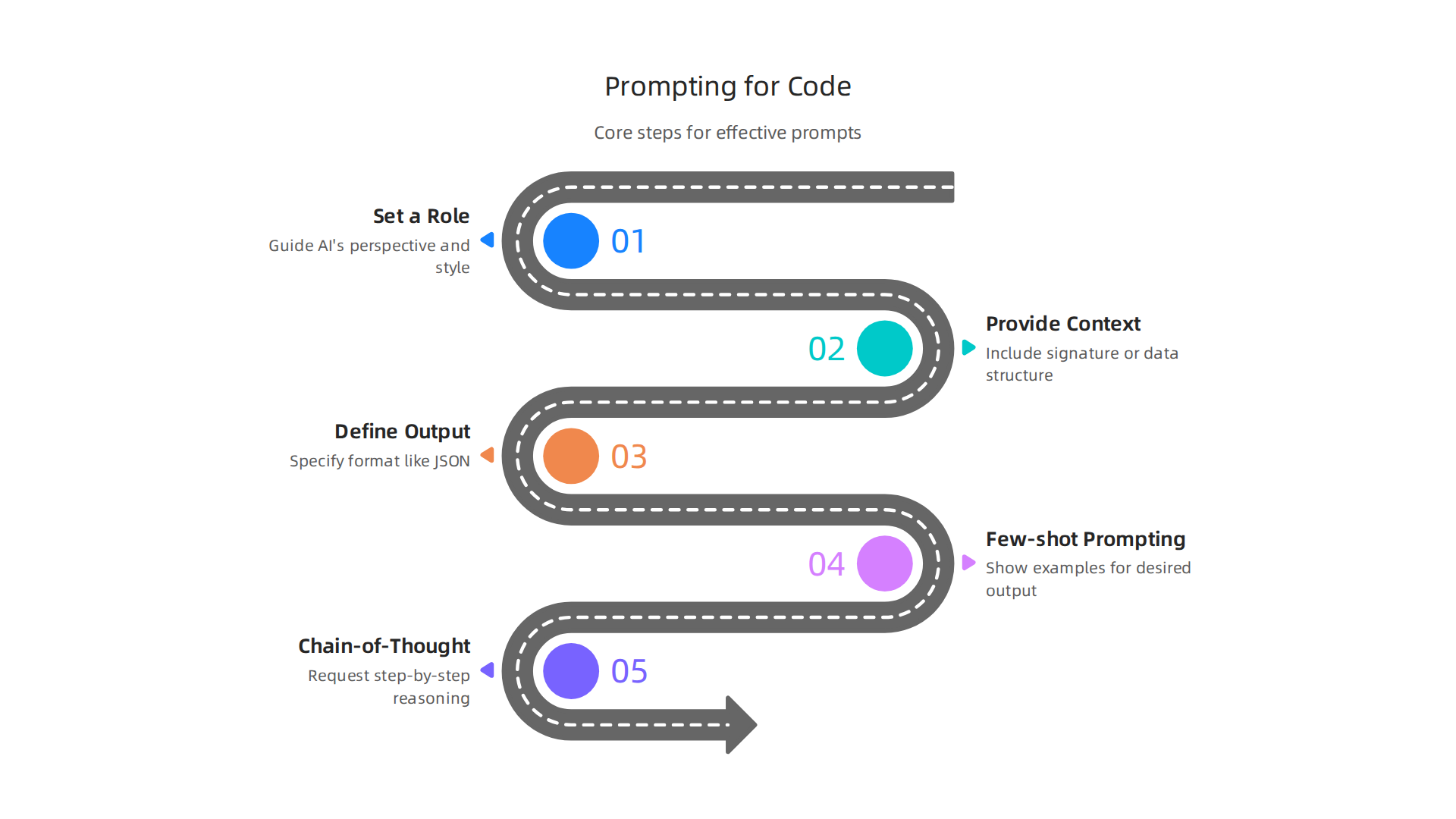
Ask for JSON if you are feeding the result into another tool. Ask for Markdown if a human will read it.
Techniques like few-shot prompting also help. Give the model one or two examples of the pattern you want. For instance, show it a correct input-output pair before asking it to handle a new case. Chain-of-thought prompting works well for complex logic: tell the AI to explain its reasoning step by step before writing the final code.
Here is the trick that separates good teams from great ones: build a prompt library. Save your best prompts as reusable templates. When you find a prompt that consistently generates solid code, store it with a name and description. Share it with your team. Over time, these prompts become your team’s shared knowledge base.
Finally, treat prompt engineering as a skill you practice daily. Take a weak prompt and rewrite it until the output improves. Experiment with different temperature settings. A low temperature (0.0 to 0.3) is best for code generation where consistency matters. A higher temperature works for brainstorming ideas.
If you want to go deeper into advanced techniques, check out this guide on advanced prompt engineering 2026 techniques for reliable AI systems. It covers how to build test sets, use XML tags for structure, and validate outputs automatically.
And stay current. The field moves fast. A weekly newsletter like The AI Newsletter Worth Reading delivers clear updates on new models, prompt strategies, and real-world usage tips straight to your inbox.
Security and Compliance: Safeguarding Your Code with AI Tools
Of course, getting great output from generative AI tools is only part of the story. Every time you paste code into an AI prompt, you are sending that code to a third-party server. That might be your company’s core algorithm, a database connection string, or internal business logic. If that code leaks, the consequences could be severe.
This risk is real. When you use cloud-based AI models, your inputs are often processed on the provider’s infrastructure. Some providers keep your data for training or logging. Others promise data isolation, but you still need to check their terms carefully. The safest approach is to treat every line of code you paste as sensitive until you verify the vendor’s privacy policy.
That is where compliance frameworks come in. Standards like SOC 2, GDPR, and ISO 27001 set clear rules for how companies handle data.

Before adopting any AI tool, your team must confirm that the vendor follows the relevant frameworks. This is not just good practice. It is often a legal requirement, especially if you work in healthcare, finance, or government.
One way to stay safe is by using on-premises or self-hosted AI tools. Instead of sending your code to a cloud API, you run the model on your own servers. This keeps all data inside your network. Open-source models like Llama or Mistral can be deployed locally, giving you full control over privacy. Some commercial providers also offer dedicated instances where your data never leaves your environment.
When evaluating tools, look beyond features. Check how the vendor handles data retention, encryption, and access controls. A good rule of thumb is to ask: "If I paste my entire codebase into this tool, am I comfortable with that?" If the answer is no, find a solution that fits your security needs.
For a deeper look at evaluating AI tools with compliance in mind, check out this guide on selecting AI software development tools for your 2026 team. It covers what to look for in vendor security promises and how to match tools to your organization’s risk tolerance.
Also, remember to keep data privacy top of mind when writing prompts. Include only the minimum code needed to get good output. As one guide on prompt engineering best practices notes, being careful with the data you include in prompts improves AI privacy and keeps your information safer.
Measuring Developer Productivity: Key Metrics and Real-World Results
Once you have secured your AI tooling, the next question is simple: Is it making your team faster? The answer is not automatic. Just handing developers access to generative AI tools does not guarantee productivity gains. You need to track the right metrics to know what is working.
Traditional measures like lines of code written or number of commits do not tell the full story anymore. In fact, they can mislead you. AI-assisted workflows can inflate output volume without actually increasing value delivered. That is why teams in 2026 are shifting toward smarter signals.
According to the Developer Productivity Benchmarks 2026, the industry average for complexity-adjusted throughput sits at 8 points per engineer per week for all work, and 12 points per week for AI-assisted work. This kind of benchmark helps you compare your team against real-world data instead of guessing.
So what should you track? Start with cycle time. This measures the time from when work begins on a feature until it is merged and deployed. A shorter cycle time means your team is shipping value faster. Next, track pull request throughput. How many PRs does each engineer merge per week? When combined with cycle time, this gives you a clear picture of delivery speed.
But speed without quality is dangerous. That is where bug density comes in. You need to split this metric for AI-assisted code versus human-written code. The difference tells you whether generated code is adding hidden complexity. The autonomous development metrics guide from Augment Code covers why tracking defect density by source is becoming a standard practice in AI-assisted teams.
Another useful approach is A/B testing. Run a sprint where part of your team uses AI tools and another part does not. Compare the real results for PR throughput and lead time. This direct comparison removes the guesswork.
If you want to dig deeper into matching tools to your team’s workflow, check out this guide on how to choose the right AI tools for developers to boost productivity. It walks through what to look for when evaluating options.
The key takeaway is this: measure before you adopt, measure while you adopt, and keep measuring after. Without data, you are just guessing. And to stay on top of how these tools and metrics evolve, The AI Newsletter Worth Reading delivers clear daily AI insights straight to your inbox.
Real-World Case Studies: How Teams Are Boosting Productivity with AI
Metrics give you a scoreboard, but case studies show what is actually possible. When teams adopt generative AI tools the right way, the results speak for themselves. The real question is how they got there and what mistakes they avoided along the way.
Take Dropbox and Webflow. Both companies actively track PR throughput delta, which compares productivity between AI users and non-users. This direct comparison validated their investment in AI tooling. The software development KPIs and company adoption report from DX shows that these teams saw measurable lead time reductions and maintained code quality by monitoring change failure rate alongside speed. They did not just hand out licenses and hope for the best. They measured before and after.
Another lesson comes from early adopters who learned the hard way. Teams that rushed AI adoption without tracking quality metrics often saw higher revert rates on AI-generated code. The smarter approach is to start with adoption metrics first. Make sure weekly active users are above 50 percent before measuring downstream impact. Companies like Microsoft and LinkedIn track AI maintainability confidence through developer surveys to understand whether engineers actually trust the code AI produces. If trust is low, tooling will fail no matter how fast PRs get merged.
A common pattern across successful teams is starting small. Pick one team, one sprint, and one clear metric like cycle time reduction. Compare the results against a control group that does not use AI tools. Once you have proof, scale carefully. This approach avoids the trap of companywide rollout before understanding what works for your specific context.
For a deeper look at matching AI tools to real engineering workflows, check out this guide on selecting AI software development tools for your 2026 team. It covers evaluation criteria that helped real teams make better decisions.
The bottom line is simple: companies that pair the right generative AI tools with disciplined measurement get the biggest gains. The ones that skip the testing phase end up with faster buggy code, not faster value. Learn from the early adopters, run your own experiments, and let real data guide your next move.
The Future of AI-Assisted Development: Trends to Watch in 2026 and Beyond
So where is all this heading? The pace of change in generative AI tools is not slowing down at all.

If you thought 2025 was fast, 2026 is shaping up to be a whole new game. The tools that helped you write code faster last year are now learning to plan entire projects on their own.
The biggest shift is agentic coding. Instead of just suggesting the next line, AI can now plan steps, call external tools, debug its own output, and hand off work when it needs human judgment. Some teams are already testing AI that writes an entire microservice from a short description. It selects dependencies, manages state, and sets up communication between services without a developer touching the base structure. According to Microsoft’s research on the 7 trends to watch in 2026, these AI agents are becoming digital coworkers that help small teams punch above their weight.
Another major shift is multi-modal models. These tools do not just read text. They look at UI mockups, diagrams, and documentation to understand what you are building. That means you can describe a feature in plain language, draw a quick wireframe, and have AI generate working code that matches both. This makes collaboration between designers and developers much smoother.
Specialized models are also arriving fast. Instead of one giant model trying to do everything, teams are adopting domain-specific AI trained on their own codebases. A model trained on financial services code will understand compliance rules and security patterns better than a general tool ever could. This trend toward local and specialty models is already gaining traction as companies realize that accuracy matters more than raw speed.
What does this mean for you as a developer or team lead? It means the skills you build today will change how you work tomorrow. The shift from passive autocomplete to active autonomous planning is real. The best way to prepare is to stay informed and keep experimenting with the latest tools. For a deeper look at these upcoming shifts, check out the trends driving AI innovation in 2026.
If you want to keep up with all these changes without spending hours digging through news, there is a simpler way. The AI Newsletter Worth Reading delivers clear daily updates straight to your inbox. It covers the tools, trends, and insights that actually matter for developers, so you never fall behind.
Summary
This guide cuts through the noise around generative AI tools for software development and focuses on what actually improves productivity in 2026. It explains where AI helps most (boilerplate, tests, refactors, docs), highlights the trust and accuracy gap that still requires human review, and compares leading code assistants and their strengths. You’ll learn practical steps to integrate AI into IDEs and CI/CD, how to write better prompts and build a prompt library, and what security and compliance checks to perform before sending sensitive code to a vendor. The article also shows which metrics matter—cycle time, PR throughput, and defect density—and how to run A/B tests and pilot programs. Finally, it reviews real company case studies and highlights future trends like agentic coding, multi-modal models, and specialized local models so teams can plan for what’s next.