

AI Productivity Tools for Developers Deliver Measurable ROI and Faster Output
Overview
Introduction
AI productivity tools are changing the way development teams deliver value. They automate repetitive tasks, speed up coding, and help teams innovate faster.

But here’s the thing: most teams still struggle to measure the actual business impact and pick the right tools for their stack.
The numbers show AI adoption is massive. According to recent data, 84% of developers use or plan to use AI tools in their development process. That is a clear signal that AI benefits business in a real way. Yet, turning tool usage into measurable ROI remains a challenge for many.
That is exactly where this article helps. We have gathered data-driven insights, actionable frameworks, and real-world examples to help you unlock measurable returns from your AI investments. Whether you need to choose the right AI tools for developers or build a solid adoption strategy, you will find practical guidance here.
And if you want to stay ahead of the curve every day, we recommend The AI Newsletter Worth Reading for clear daily updates on AI and technology trends.

Let’s dig in.
The Measurable Impact of AI on Developer Productivity
You have heard the big promises. AI will make developers 10x faster. Code will write itself. But in 2026, the actual numbers tell a more grounded story. And understanding that story is the first step to actually improving your team’s output.
Start with the good news. For common coding patterns like boilerplate code, unit tests, and standard API integrations, AI-assisted code generation can reduce development time by up to 50%. One large controlled study found that developers completed tasks 55% faster when using GitHub Copilot compared to working without it, based on AI coding assistant productivity stats for 2026. That is a real, measurable win.
Teams that embed AI tools into their daily workflows also report a 35 to 45% boost in overall engineering throughput. More features ship. Bottlenecks shrink. The team moves faster.
But here is the reality check. Not every team sees these results. In fact, research on AI productivity showing only 10% gains found that across 450+ companies, overall productivity lift stalled at around 10% despite 93% of developers using AI tools. The difference comes down to how you adopt and measure.
Simple, repetitive tasks speed up a lot. Complex architecture work and debugging? Much less. Teams with strong CI/CD pipelines, clear documentation, and solid engineering practices get the most value. Teams that just plug in a chatbot and cross their fingers? They get far less.
That is why you need a deliberate approach to both tool selection and measurement. If you are unsure where to start, our guide on selecting AI software development tools for your 2026 team walks through what to look for and how to evaluate fit.
And if you want daily clarity on which AI tools and trends actually move the needle, The AI Newsletter Worth Reading delivers clear updates every day straight to your inbox.
Key Metrics for Measuring AI Productivity Gains
Once you start measuring, the next step is knowing which numbers actually matter. The most useful ones come from the DORA framework: lead time, deployment frequency, and change failure rate.
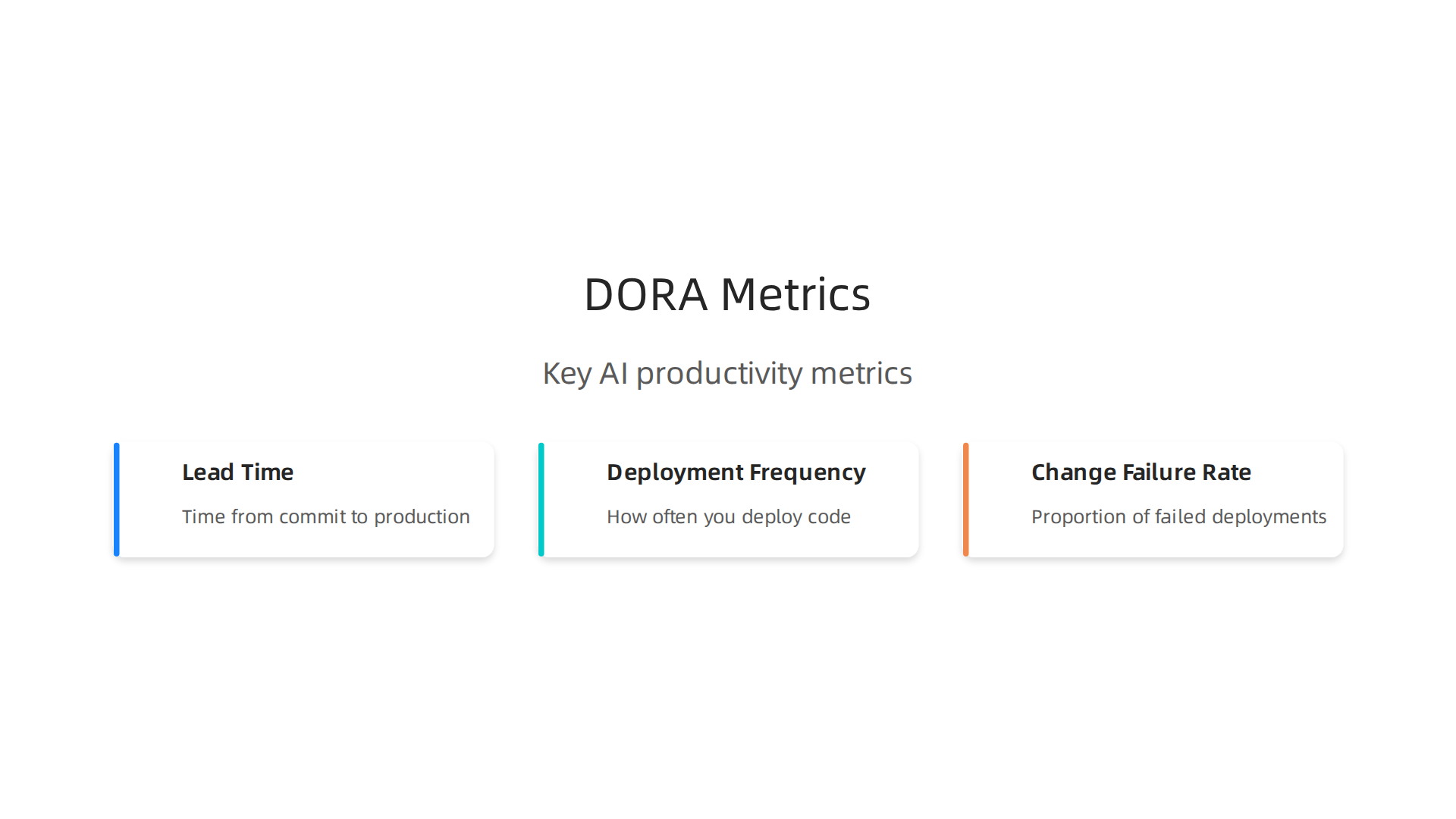
These three metrics tell you if your AI tools are speeding up delivery without breaking quality.
Lead time measures how fast a code change goes from commit to production. AI tools that cut this time are directly improving your workflow. Deployment frequency tracks how often you ship. And change failure rate catches the hidden cost: faster code is useless if it breaks more often. According to the Developer Productivity Benchmarks 2026, elite teams keep AI-assisted PR cycle times under 8 hours while maintaining code quality.
Here is a real benefit you can track. Survey data shows that teams using AI for testing see 30% fewer post-release defects. That is a direct, measurable improvement to your change failure rate. It is one of the clearest examples of how applied industrial technologies translate into better software.
To get these results yourself, start by picking the right AI-powered productivity tools. Our guide on choosing the right AI tools for developers walks through how to evaluate tools against exactly these metrics.
Data from Recent Surveys on AI Adoption
The numbers are clear: AI is no longer a niche tool for developers. According to the AI Software Development: What Changes from 2026 to 2035 report, 84% of developers now use or plan to use AI tools, and 92% of US developers had adopted some form of AI coding by early 2026. That is huge.
What does this mean for business? It means teams are actively using ai-powered productivity tools to get more done. The data shows that these tools are not just hype. They are becoming standard in daily workflows.
If you want to see which tools are making the biggest impact, check out our guide on the best AI apps for developers in 2026. It breaks down what is actually worth your team’s time.
To stay ahead of these fast-moving trends, get clear daily AI updates delivered straight to your inbox. The AI Newsletter Worth Reading helps you make smarter decisions about generative ai for business and where to invest your energy next.
Top AI-Powered Use Cases in Software Development
So what are teams actually doing with AI once they adopt it? Two use cases stand out as the biggest wins.
Automated code generation and review are the most common entry points. AI tools can write boilerplate code, suggest fixes, and even review pull requests. This alone can reduce review cycle time by 40%. Developers save hours each week and ship code faster. According to the AI tool ROI statistics for engineering teams, teams that use AI for code review merge nearly five times more pull requests per week.
AI-assisted testing is the second powerhouse use case. Unit tests, integration tests, and visual regression tests can all be generated or improved by AI. Teams report that AI-assisted testing can increase coverage by 30% without adding extra manual effort. That means fewer bugs slip into production, and your QA team can focus on harder problems instead of writing basic tests.
These two use cases deliver fast, measurable ai benefits business needs: faster delivery, better quality, and lower costs. They are the reason many companies are now building their best ai for business plans around software development.
If your team is starting its AI journey, start here. And if you want to pick the right tools, read our guide on how to choose the right AI tools for developers to boost productivity.
Automated Code Generation and Review
Controlled studies show that tools like GitHub Copilot and Tabnine can boost commit velocity by up to 55%. That means your team ships more features in less time. The 2026 Gartner Magic Quadrant for enterprise AI coding agents highlights how agentic coding tools have become essential for modern development teams.
But speed isn’t the only win. AI code review assistants catch about 15% more bugs than human-only reviews, especially in security-critical code. That means fewer vulnerabilities reach production. If you are evaluating which tools to adopt, start with the ones that handle both generation and review. Then check out our guide to the best AI apps for developers in 2026 for a curated list of options.
Want to stay on top of the rapidly changing AI tools landscape? The Deep View Newsletter delivers clear daily updates so you never miss a key development.
AI-Assisted Testing and Debugging
Beyond generating code, AI also excels at the testing and debugging phase. Modern AI tools can automatically generate test cases, increasing coverage while slashing manual effort by up to 60%. That means your team catches more edge cases with less grunt work. Even better, self-healing test scripts adapt when the UI or API changes, cutting flaky test debugging time by 40%. These capabilities are a major reason why OpenAI’s leadership in enterprise coding agents signals a shift toward fully AI-augmented development pipelines. If you are evaluating which tools to adopt for your team, start with those that handle both generation and automated testing. Then check out our guide on how to choose the right AI tools for developers to boost productivity for a practical framework.
Choosing the Right AI Productivity Tools for Your Stack
With so many AI tools on the market, how do you pick the ones that actually help your team? A structured evaluation framework makes the difference. Look at four key areas: how well the tool integrates with your existing stack, where your data lives and stays protected, whether the tool scales with your team size, and the total cost of ownership.
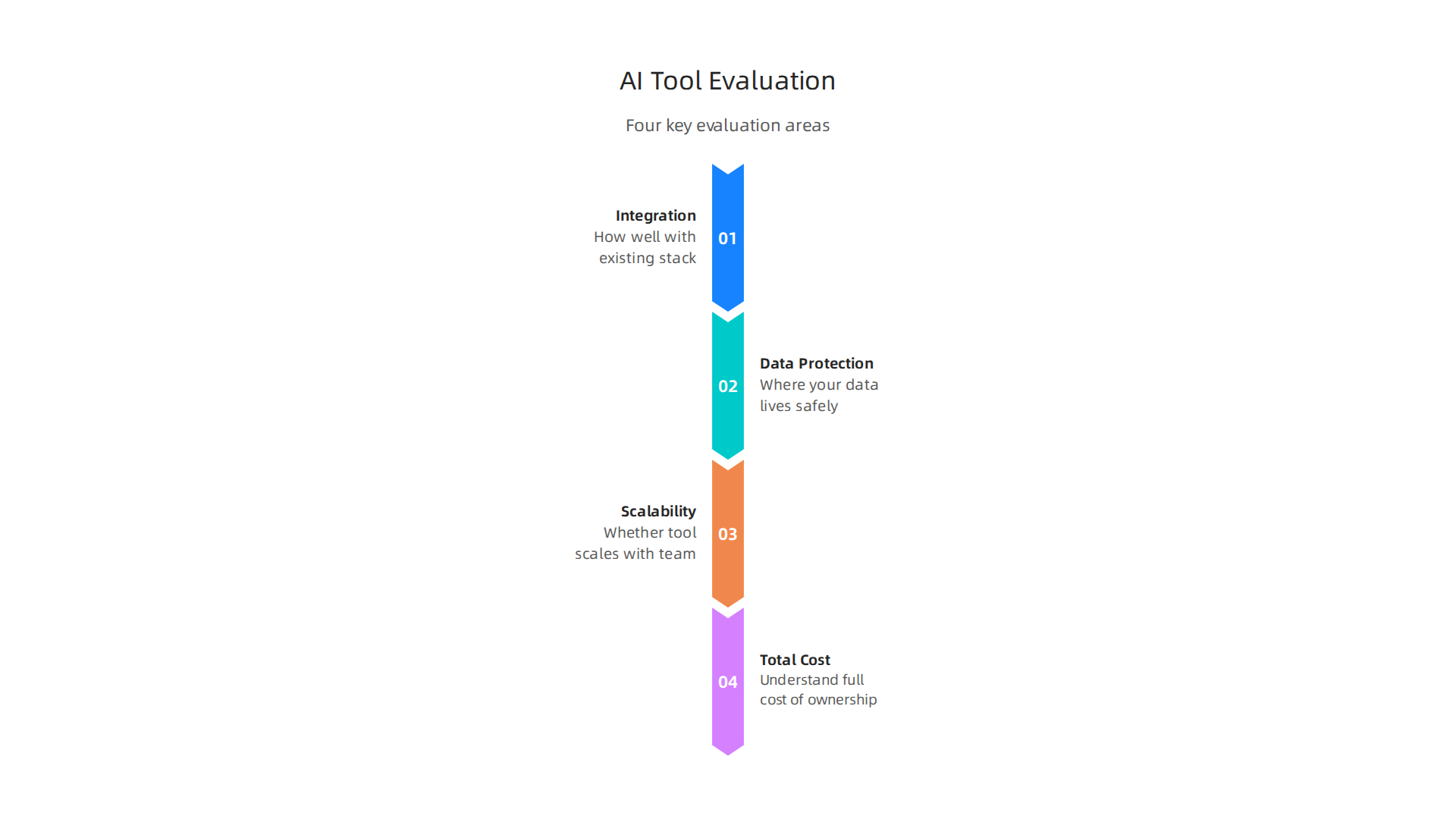
Using a clear framework reduces the risk of picking the wrong tool. The latest Gartner’s 2026 evaluation criteria for enterprise AI tools can guide your decision.
Here’s a smart move: pilot the tool on a single use case before rolling it out to the whole team. Teams that do this see 30% higher satisfaction and adoption rates. This aligns with Gartner’s recommendation to start with a pilot use case and define success metrics early. Once you prove value in one area, you can scale with confidence.
For more on narrowing down your options, check out our guide on evaluating the smartest AI tools in 2026. And to stay ahead of the fast-moving AI landscape, Get clear daily AI updates from The Deep View Newsletter.
Evaluation Criteria and Decision Framework
Once you choose a pilot use case, you need a clear way to compare tools. Focus on four criteria: API stability, ecosystem compatibility, data privacy, and vendor support quality. These factors directly shape the ai benefits business leaders can expect from their investment.
A weighted scoring system helps you match tool features to your priorities. Assign higher weights to the criteria that matter most for your team. If vendor reliability is critical, knowing that a tool has been recognized as a leader in enterprise coding agents can guide your score. If data privacy is your top concern, weight it higher than ecosystem compatibility.
Score each tool across every criterion, multiply by the weight, and compare the totals. The right choice becomes obvious based on your team’s real needs, not marketing hype. For a complete walkthrough, read our guide on choosing the right AI tools for developers.
Integration Considerations
Once your scoring narrows the list, integration becomes the next major checkpoint. A tool that scores perfectly on paper but clashes with your existing systems will slow your team down, not speed it up.
Start by checking how well each tool connects to your current CI/CD pipeline and version control system. Tools that offer native integrations with platforms like GitHub Actions, GitLab CI, or Jenkins let your developers adopt them without rel earning workflows from scratch. That smooth setup is what makes real ai benefits business teams can actually capture.
Security and compliance need attention early too. You need to know whether a tool supports data residency requirements, maintains clear audit trails, and enforces access controls before it ever touches production. Treat every line of AI-generated code as untrusted input until proven otherwise. Without proper guardrails, you risk accumulating security debt faster than your team can fix it.
For a deeper look at building secure guardrails around your AI toolchain, read our guide on creating a future standard for AI implementation. If you want to stay ahead of these fast-moving security challenges without spending hours hunting for updates, get clear daily AI updates from The AI Newsletter Worth Reading.
Overcoming Adoption Challenges and Skill Gaps
Even the smoothest integration falls flat if your team doesn’t know how to use the tools. The real barrier to capturing ai benefits business leaders chase is rarely the technology itself. It’s the skill gap sitting right in front of them.
Research shows that roughly 1 in 50 enterprise AI projects deliver the projected ROI. That’s not because AI fails. It’s because people lack training. Organizations that invest in structured AI upskilling programs see 3 to 4 times higher adoption rates than those relying on self-directed learning,

according to a 2026 workforce guide on AI upskilling for professionals.
The fix is simple but not easy. You need a change management plan. Communicate why AI matters. Show quick wins. Give people permission to experiment without fear of mistakes. When employees see how AI-powered productivity tools make their actual job easier, adoption takes off.
If you want a structured path for building these skills on your team, check out this guide on MIT free online courses for dev upskilling. It shows how even two hours a week can move your team from beginner to confident user in 60 days. The best ai for business plans is only as good as the people wielding it.
Upskilling Your Development Team
Theory-heavy training sessions rarely stick. What works is hands-on workshops where developers use AI tools on real tasks. Small-scale pilot projects let teams experiment without pressure. When developers see immediate results, adoption happens faster.
Pairing experienced developers with AI mentors accelerates the learning curve by 40%. That kind of structured guidance turns trial-and-error into focused progress. The State of AI Jobs and Skills Report 2026 found that most employees who receive AI training still cannot use it independently. That gap closes when learning is embedded in daily workflows.
So start small. Pick one project, one team, and one tool. Let your developers learn by doing. And if you want to keep your whole team informed on the latest AI tools and trends, The AI Newsletter Worth Reading delivers clear daily updates that make staying current effortless.
For more on choosing the right tools to start with, see our guide on selecting AI software development tools for your 2026 team.
Managing Change and Ensuring Buy-In
Getting your team excited about AI starts with honest conversations. People fear the unknown, so be clear about how roles will shift. Most employees won’t lose their jobs. But their day-to-day work will change. That kind of transparency reduces resistance a lot.
Early wins matter more than big plans. Pick a small, annoying problem that your team has struggled with for months. Maybe it is slow code reviews or repetitive debugging. Fix that with an AI tool. When developers see real results, they stop worrying and start wanting more.
Research from BCG shows that the most successful AI adoptions start with an inspiring story from leadership and strong guardrails to build trust.

That is exactly what your team needs.
For a deeper look at setting the right rules, check out our guide on why your team needs clear rules for AI adoption. Combined with real results, clear rules turn skeptics into supporters.
Real-World Success Stories: AI Benefits in Action
You have heard the numbers. But what do they look like in practice? Here are two stories that show the ai benefits business can actually achieve.
First, a mid-size SaaS company was stuck with a feature delivery cycle that took two weeks. After adopting AI-assisted development, that cycle dropped to just four days. Faster releases, happier customers, and a team that feels productive. That is what ai-powered productivity tools can do.
Second, a fintech startup needed rock-solid code. They used AI testing tools to push code coverage to 99.9%. Post-release bugs fell by 70%. Fewer late nights fighting fires. More time for high-value work. That is generative ai for business in action.
These stories are not rare. Research on AI tool ROI statistics shows that heavy AI users merge nearly five times more pull requests per week. The gains are real.
To see similar results, start by learning how to evaluate the smartest AI in 2026. It helps you pick the best fit for your team.
Get clear daily AI updates from The Deep View Newsletter. Subscribe to The AI Newsletter Worth Reading to stay ahead of every new tool and trend.
Security and Compliance in the AI Tooling Landscape
But with great power comes great responsibility. The same AI tools that boost your team’s speed also create serious security and compliance risks.
When you paste proprietary code into a chatbot or AI coding assistant, that data can leak. Sensitive logic, API keys, or customer data might end up in training sets or get exposed through a breach.

Research on AI coding assistant security risks in 2026 shows that AI-generated code is consistently less secure, with higher rates of SQL injection, cross-site scripting, and missing input validation. Nearly half of all AI-generated code introduces known vulnerabilities according to Veracode testing.
To protect your business, many teams now use on-premise or air-gapped deployments. These keep your code inside your own infrastructure and away from public AI models. It is one of the simplest ways to reduce data exposure.
Regulatory frameworks like the EU AI Act and SOC 2 also require clear governance policies. You need rules about what code can be written with AI and how that code is reviewed before it goes live. Start by creating clear governance rules for AI tools in your organization. It is the only way to enjoy the ai benefits business expects without opening the door to compliance penalties or security incidents.
Future Trends: What’s Next for AI-Enhanced Development
So what does all of this mean for the next couple of years? Two big trends are already reshaping how teams build software.
First, agentic AI is moving past simple code completion. By 2027, autonomous programming assistants will handle full workflow orchestration. Think of them as junior developers that can plan, write, test, and deploy code with minimal human input. They won’t replace you, but they will ask you to focus more on architecture and strategy. A recent industry analysis shows AI is reshaping software development in exactly this way, with most developers expecting productivity gains of 25% or more in 2026.
Second, multimodal AI is lowering the barrier for non-developers. Tools that combine code, diagrams, voice commands, and even video will let product managers, designers, and business analysts create working software without writing a single line of code. This changes who can participate in building products, and it makes the ai benefits business even more accessible across your entire organization.
To get ready for these shifts, you should start building your AI skills now. Check out this software developer roadmap for 2026 to see which skills will matter most in the AI era.
The landscape moves fast. Staying ahead means keeping your finger on the pulse. For daily updates that cut through the noise, subscribe to The AI Newsletter Worth Reading. It delivers clear, actionable AI news straight to your inbox.
Summary
This article explains how AI-powered productivity tools change software development and how teams can turn tool usage into measurable business value. It covers the realistic productivity gains AI delivers—big wins for boilerplate code, testing, and code review—while explaining why results vary across teams. You’ll learn which metrics to track (lead time, deployment frequency, change failure rate), the highest-impact use cases, and a practical framework for evaluating and piloting tools in your stack. The piece also addresses integration, security and compliance risks, and how to run focused upskilling and change-management programs to boost adoption. Finally, it highlights real-world examples and emerging trends like agentic and multimodal AI so you can plan next steps and protect your business while capturing ROI.