

HubSpot AI 2026 Breeze Features That Deliver Real Results
Overview
Introduction
AI is changing how businesses operate at a speed we have never seen before. From automating repetitive tasks to uncovering hidden patterns in customer data, artificial intelligence is now a must-have for companies that want to stay competitive. And HubSpot is leading this shift with its powerful AI tools.

In 2026, HubSpot’s Breeze AI platform is transforming how marketing, sales, and service teams work. According to a detailed review of HubSpot AI 2026: What’s Actually Useful (and What to Skip), the platform now includes AI audience discovery, Breeze AI Assistants, and smart features that work across all Hubs. With over 100 updates from Spring 2026 alone, the pace of innovation is staggering.
But here is the challenge. With so many new features rolling out fast, it can be hard to know where to focus. Developers, entrepreneurs, and business leaders need practical guidance to make the most of HubSpot AI.

You do not have time to guess which tools actually move the needle.
If you are an entrepreneur exploring how AI can help you build better products, take a look at our list of 9 AI startup ideas for 2026 that solve real problems.
That is exactly why this article exists. I will walk you through what HubSpot AI can do in 2026, which features deliver real results, and how you can start using them today. Whether you are a developer building on the platform or a founder looking to grow your business, you will find actionable insights here.
And if you want to stay ahead with daily updates on AI tools and trends, subscribe to The AI Newsletter Worth Reading for clear daily insights.
Let us dive in.
Understanding HubSpot’s AI Ecosystem
HubSpot’s artificial intelligence efforts come together under one name: Breeze. This AI platform touches nearly every part of the HubSpot experience. As one detailed explanation of HubSpot AI Agents 2026 overview notes, Breeze is designed to be a complete AI solution for go-to-market teams that is easy to use and fast to deliver results.
Breeze has three main parts that work together.
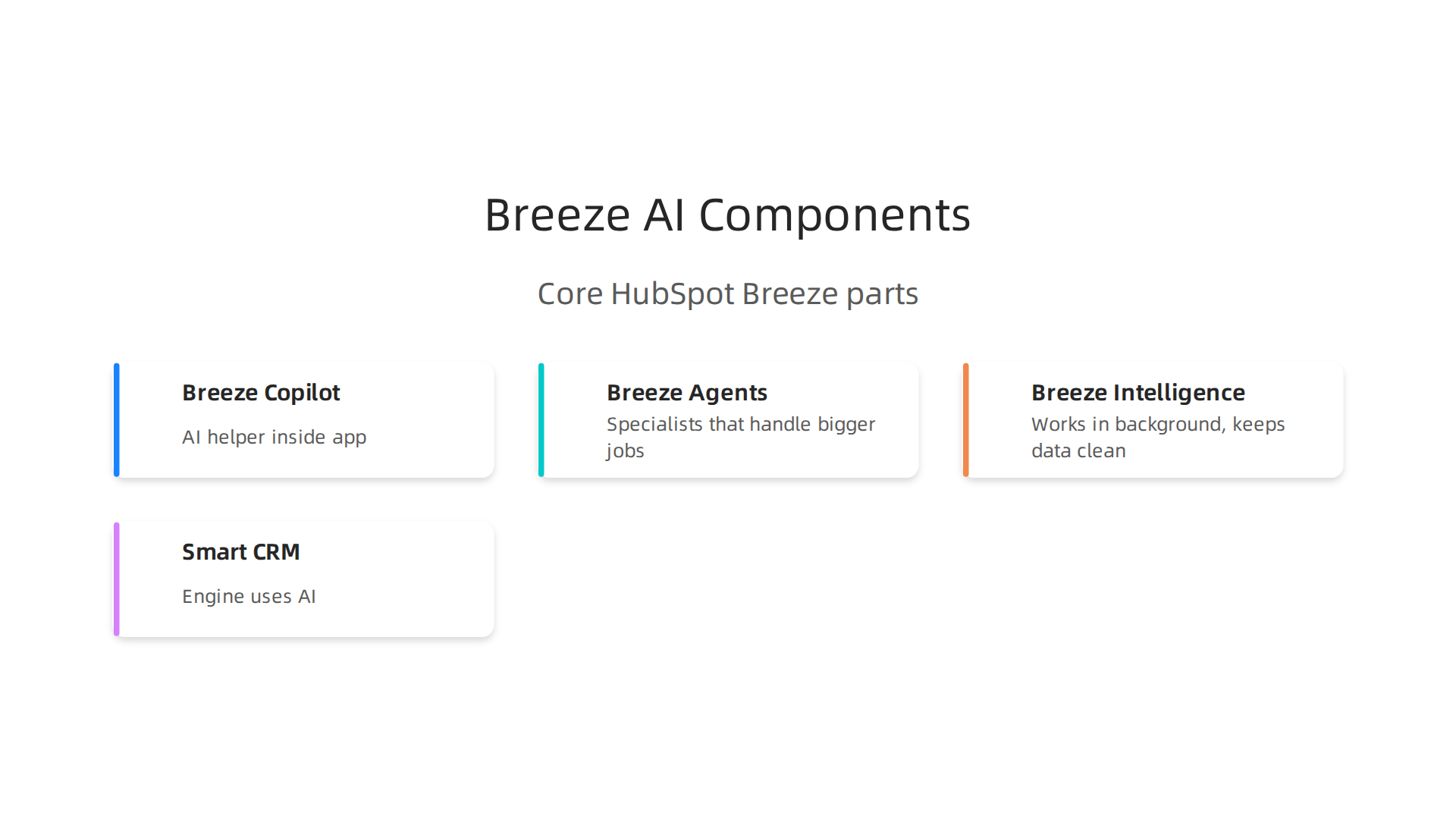
Breeze Copilot is the AI helper you talk to inside the app. You can ask it to draft an email, summarize a long sales call, or build a report just by typing what you need. Breeze Agents are specialists that handle bigger jobs on their own. There are four agents so far. The Content Agent writes blog posts and landing pages in your brand voice. The Social Media Agent watches your online presence and suggests posts. The Prospecting Agent reaches out to new leads with personalized messages. And the Customer Agent answers support questions around the clock. Breeze Intelligence works in the background to keep your contact records clean and full of useful data.
The Smart CRM is the engine behind all of this. It uses AI to handle the boring stuff automatically. When a new lead comes in, the system can fill in missing details from public data sources using Smart Properties. It can group contacts by behavior, score them based on how likely they are to buy, and flag important signals like when a customer is ready to make a purchase. This means your team spends less time typing data and more time building real relationships.
For developers, HubSpot opens up these AI features through APIs. You can build custom integrations that pull AI insights into your own apps. You can create automated workflows that trigger AI actions. You can even connect external tools to work alongside the Breeze layer. This makes Breeze a flexible platform, not just a fixed set of tools you have to use as is.
If you are building your own solutions on top of AI platforms, start by choosing the right AI tools for developers to boost your productivity.
Content AI and ChatSpot round out the ecosystem. Content AI helps writers create blog posts, emails, and landing pages much faster by generating drafts based on your brand guidelines. ChatSpot was the original conversational AI assistant that helped users search CRM data and perform tasks through chat. It paved the way for Breeze Copilot. Together, all these tools form a complete AI ecosystem inside HubSpot that can transform how your team works every day.
HubSpot AI for Business Applications
But how does this ecosystem help you with real daily tasks? Let’s look at two big areas: email marketing and sales.
For email marketing, HubSpot AI takes the guesswork out. It can write subject lines, body copy, and calls-to-action based on a simple prompt. More importantly, it personalizes content for each reader. The system knows what each contact has clicked, opened, and bought. So it can send different messages to different people automatically. It also picks the best send time for each person based on their past behavior. According to the best AI marketing automation software of 2026, HubSpot uses predictive lead scoring and dynamic content to make sure you reach the right person with the right message at the right moment.
For sales, the AI scores leads based on historical data. It looks at past deals that closed and finds patterns. Then it tells your sales team which new prospects look most like your best customers. This means your reps spend time on leads that are actually likely to buy, not just the ones who call first. The system also flags risks, like when a deal might be slipping away. As the HubSpot AI and CRM in 2026 report explains, the platform predicts next actions and suggests improvements to workflows.
The best part? You don’t need to be a technical expert to use these tools. HubSpot’s Breeze AI lets you build workflows just by typing what you want. A marketer can say "send a welcome email to new leads and add a task for sales" and the system creates it. For developers and power users, the same platform offers deeper customization through APIs and advanced settings. If you want to explore the developer side further, check out this guide on selecting AI software development tools for your 2026 team.
To keep up with how AI is rapidly changing tools like HubSpot, a daily newsletter can help. Get clear daily AI updates from The AI Newsletter Worth Reading so you never miss what matters.
Sales and Marketing AI
We already looked at how HubSpot AI improves email and sales. But the platform goes further. It helps you create complete marketing campaigns with less effort.
The built-in content generator writes blog posts, social updates, and landing pages. You describe your topic, tone, and length. In minutes, the AI delivers a ready-to-edit draft. That frees up time for entrepreneurs who manage content alone. HubSpot’s own AI sales and marketing tools page explains that the AI can even build an entire website in just minutes.
A/B testing becomes automatic too. HubSpot AI tests subject lines, buttons, and layouts. It learns which version performs best and adjusts your campaign without manual work. You stop guessing and start improving.
For entrepreneurs, this means launching professional campaigns fast.

You get the reach of a big marketing team from one tool. If you are building a startup and want more ideas, check out this collection of 9 AI startup ideas for 2026 that solve real problems. It shows how generative AI assistants and other tools can help you grow even faster.
Customer Service AI
Customer support is another area where HubSpot AI makes a big difference. The Service Hub includes smart chatbots that talk to visitors on your website. They answer questions instantly by searching your knowledge base and help pages. That means customers get fast answers even when your team is offline.
The system also automates ticketing. When someone sends a support request, the AI organizes it, adds priority tags, and routes it to the right person. Your team spends less time sorting emails and more time solving problems.
Because everything connects to the CRM, you get a full picture of each customer. You can see past conversations, purchase history, and support tickets in one place. This HubSpot AI and CRM integration for unified customer views helps your team give better, faster help.
Developers can customize chat flows using APIs. You can build unique responses and workflows that match your business. If you need help designing better prompts for your chatbot, check out this guide on advanced prompt engineering techniques.
Staying current on AI tools helps you keep improving. For clear daily updates on the latest AI developments, consider subscribing to The AI Newsletter Worth Reading. It delivers useful insights straight to your inbox.
Integrating HubSpot AI with Developer Tools
So you have HubSpot AI working for customer service and sales. That is great. But maybe you want to take things further and connect it directly to your own software. The good news is that HubSpot gives developers powerful ways to build custom tools on top of its AI features.
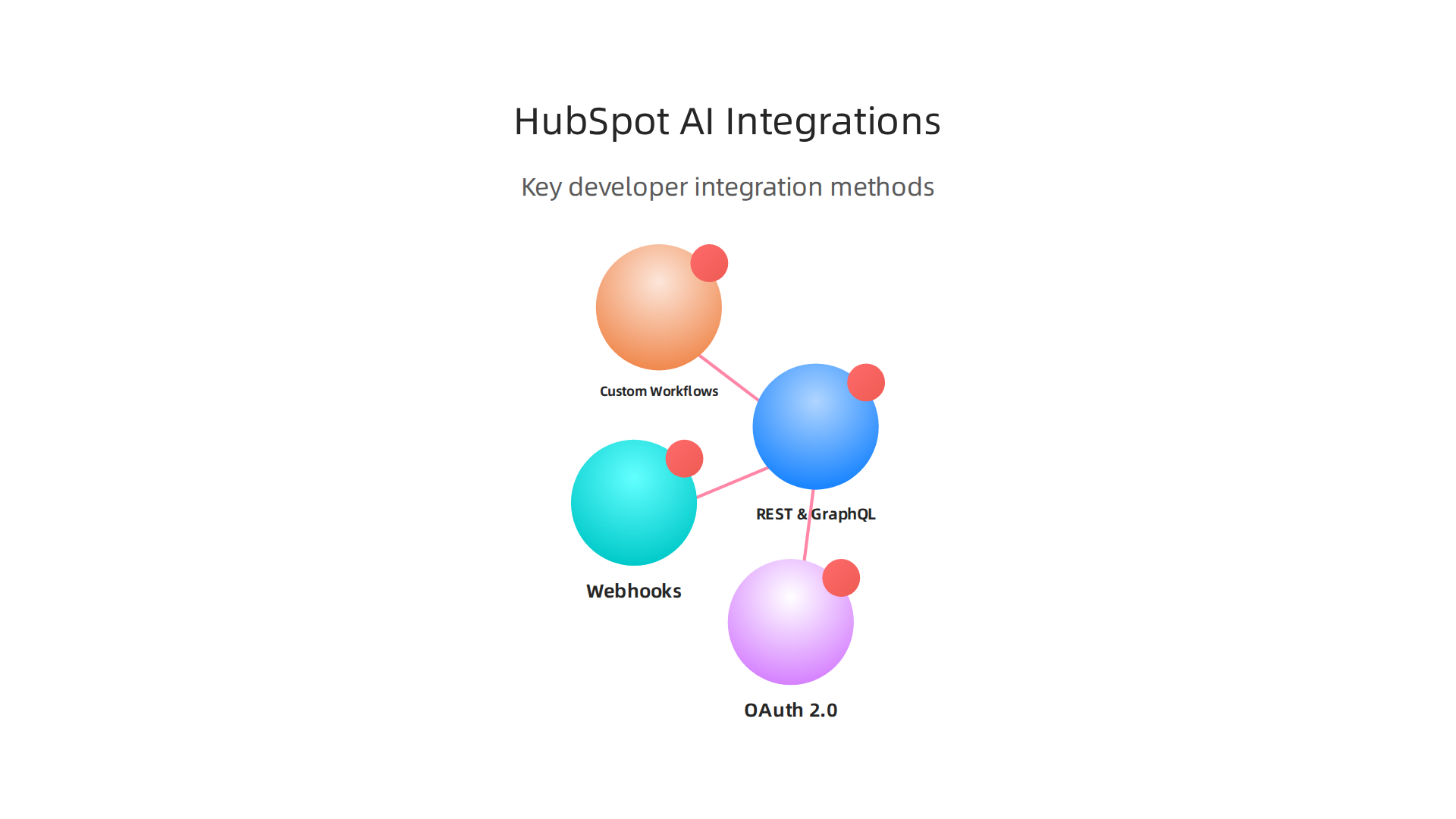
REST APIs and GraphQL give you full access to HubSpot AI data. You can read and write contacts, deals, tickets, and more. To connect securely, you need to use OAuth 2.0 or a Private App token. HubSpot no longer supports old API keys, so make sure your integration uses one of these modern methods. Follow the HubSpot API integration best practices to set up your authentication scopes correctly and avoid common mistakes.
Webhooks let you build real-time event-driven integrations. Instead of constantly asking HubSpot if something changed, you can have HubSpot tell you. For example, when a new lead comes in or a deal stage updates, HubSpot can send a webhook to your application instantly. This makes your integrations feel alive and responsive. Check out the full guide on HubSpot APIs for details on setting up webhooks and handling rate limits.
Custom workflows become even smarter with HubSpot’s custom code actions. You can write your own JavaScript or Python functions that run inside workflows. This lets you add logic like calling an external AI model, looking up data in your own database, or formatting information before saving it. Just remember that these code actions have time limits. If your task takes too long, run it on an external server instead.
When building your integration, always plan for errors. Network failures happen. Rate limits can block you. Track your API usage and retry failed requests with a backoff strategy. If you are still exploring which development tools to invest in, check out this guide on selecting AI software development tools for your 2026 team.
By combining REST APIs, GraphQL, webhooks, and custom code, you can make HubSpot AI a true part of your software stack. Your team will have the flexibility to build exactly what your business needs.
Entrepreneurship: Leveraging HubSpot AI for Growth
If you run a business, you know how hard it is to manage customers, leads, and daily tasks all at once. HubSpot AI can take some of that weight off your shoulders. It helps you work smarter by giving you clear insights and automating the boring stuff.
HubSpot AI gives you powerful analytics and insights. You no longer need to guess what your customers want. The platform studies your data and shows you patterns you might have missed. For example, it can tell you which marketing channels bring in the most valuable leads. This saves you hours of digging through spreadsheets. HubSpot’s own startup program shows how early stage founders use these tools to make faster decisions.
Predictive lead scoring helps you focus on the right people. Instead of chasing every lead equally, HubSpot AI scores each contact based on how likely they are to buy. This means you spend your time on high value prospects who are ready to say yes. The Breeze AI tools built directly into HubSpot handle this scoring automatically using your past sales data. You get a clear list of who to call first.
You can automate repetitive tasks that eat up your day. Things like sending follow up emails, updating contact records, and drafting social media posts can all run on autopilot. HubSpot’s AI agents work like extra team members who never take a break. They learn from your business and get better over time. If you want more ideas on how to apply this kind of thinking to your next project, take a look at these AI startup ideas for 2026.
Whether you are a solo founder or leading a growing team, HubSpot AI gives you back time and clarity. You can focus on building your business while the AI handles the busy work.

And if you want to keep learning about what AI can do for your business, subscribe to The AI Newsletter Worth Reading. It delivers clear daily updates so you never miss an important shift in the AI landscape.
AI-Powered Analytics
But having extra time is only useful if you know where to focus. That is where HubSpot AI powered analytics comes in. Instead of digging through endless spreadsheets, you get a dashboard that shows you exactly what matters. Your sales numbers, customer behavior, and marketing results appear in real time. No waiting for monthly reports.
HubSpot AI can also generate reports for you. It looks at your past data and spots trends you might miss. For example, it can forecast which products will sell best next quarter or which customer groups are growing fastest. This helps you make decisions based on facts, not guesses. According to the guide on AI for business development and startup growth, AI tools can quickly analyze large amounts of company data to uncover valuable insights.
With these insights, you can adjust your strategy before problems grow. Maybe you see that one marketing channel is bringing in more leads than you thought. Or that a certain customer group is starting to lose interest. HubSpot AI shows you these shifts early so you can act fast.
If you want to get the most out of AI tools like this for your own projects, learning about choosing the right AI tools for developers can help you go even further.
But that is just the start. Let us look at another way HubSpot AI can power your business.
Lead Scoring and Predictive Modeling
One powerful way HubSpot AI helps you focus on the right opportunities is through lead scoring and predictive modeling. Instead of chasing every single contact that fills out a form, the AI ranks leads based on how likely they are to buy. It looks at their behavior, like which pages they visit and how often they open your emails, plus details like their job title and company size. You decide what matters most, and HubSpot AI does the ranking for you.
HubSpot AI includes over 100 built-in AI features, including scoring leads, as part of the Breeze platform. This means you don’t need separate tools or complicated setups. The system learns from your past deals and gets smarter over time.
For entrepreneurs, this is a huge time saver. You can set up automatic actions for high-scoring leads. For example, a lead with a score above 80 might automatically get a personalized email from you. A lower scoring lead might go into a nurture sequence instead. You skip the guesswork and focus your energy where it counts.
If you are building your own AI-powered sales systems, exploring AI startup ideas for 2026 can help you think about how to apply these concepts in your own business.
Staying on top of these AI tools can feel like a full time job. To keep learning without the overwhelm, check out The AI Newsletter Worth Reading for clear daily updates on the latest AI trends and tools.
Best Practices for Developers Implementing HubSpot AI
When you build integrations with HubSpot AI, security and compliance have to come first. AI tools handle sensitive customer data, and a mistake can expose your business to serious risk. HubSpot takes this seriously. The platform follows strict standards like GDPR and SOC 2 to protect data. But as a developer, you also need to follow best practices to keep everything safe and reliable.
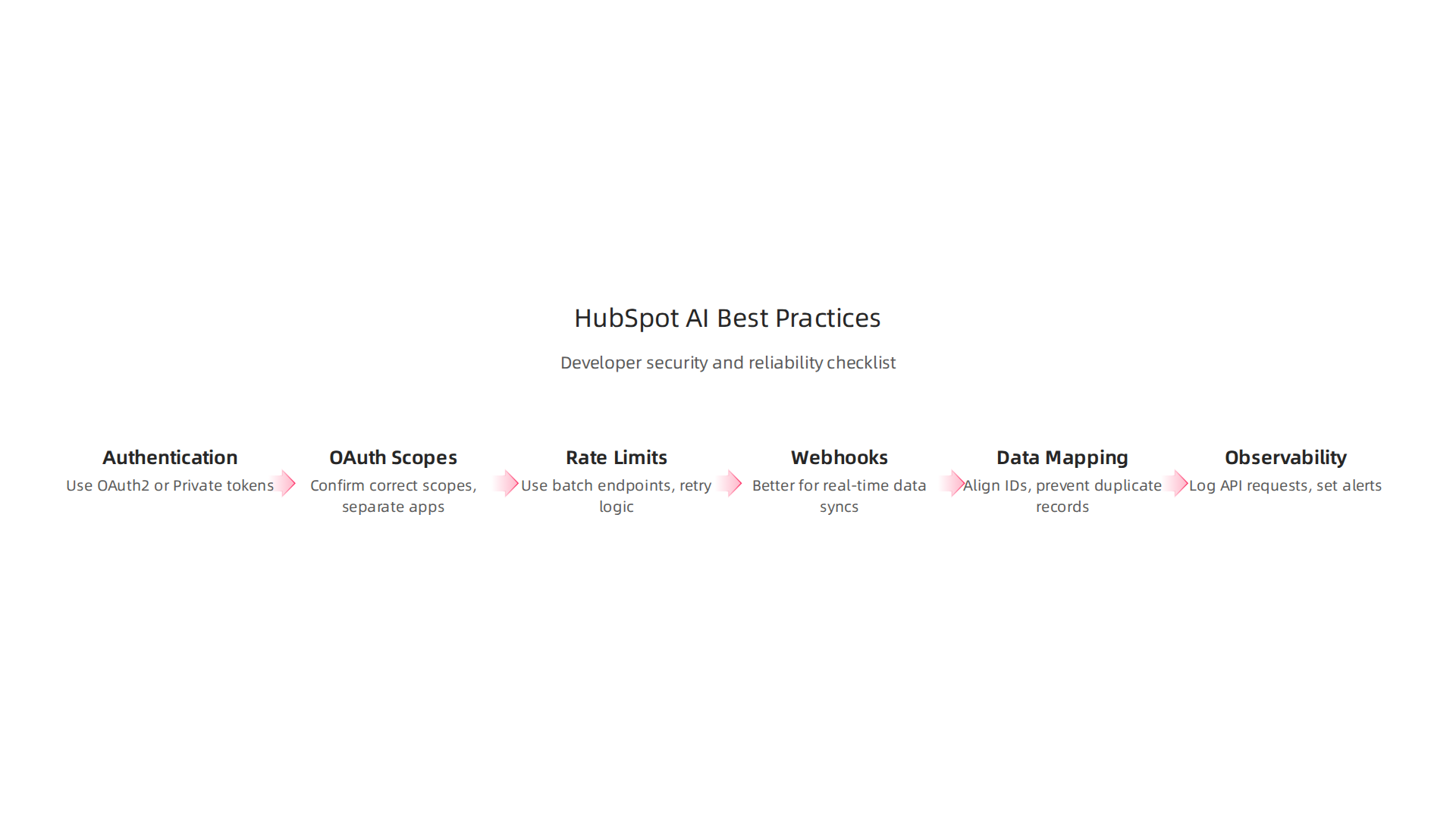
Start with authentication. HubSpot retired API keys back in 2022. All new integrations must use OAuth 2.0 or Private App Access Tokens. This is a critical shift. If you still have old integrations using API keys, update them now. For a full guide on how to set this up, check out the HubSpot API integration best practices from Chift.
Next, pay attention to OAuth scopes. Missing or misconfigured scopes can block your app from reading or writing data. Confirm you’ve enabled the correct scopes before going live. Always use separate OAuth apps for development and production. Never mix the two.
Rate limits are another common pain point. HubSpot allows 100 requests every 10 seconds for Private Apps. If your integration handles high volume, use batch endpoints and request queues. Build exponential backoff retry logic to handle 429 rate limit errors gracefully. The step-by-step guide to building a native HubSpot integration explains how to set up retry loops and detect transient failures.
For real-time data syncs, webhooks are better than polling. Use webhooks for critical events like new lead creation. Then use periodic API syncs to catch anything missed. A hybrid approach gives you both speed and accuracy. Also, handle deletions properly. Track the lastmodifieddate property to detect changes efficiently.
Data mapping matters too. Align HubSpot object IDs with your external system’s identifiers before syncing. This prevents duplicate records and broken links. For complex write operations that require multiple API calls, encapsulate the logic in its own module. Don’t spread it across your codebase.
Finally, maintain observability. Log the exact API requests sent to HubSpot and set up alerts for write failures. This makes debugging much easier when something goes wrong.
If you want to go deeper into building reliable AI systems with clear guardrails, check out this guide on advanced prompt engineering techniques for reliable AI systems. It covers the same mindset of security and reliability that applies to HubSpot AI integrations.
The Future of AI in Business Applications (2026 and Beyond)
By 2026, AI has stopped being just a buzzword. It is becoming a true partner in how businesses operate. Think about it. Instead of asking a tool to do one simple task, you now have generative AI assistants that help create content, write code, and even plan entire marketing campaigns. AI personal assistant tools are managing calendars, summarizing meetings, and drafting replies on their own.
One big shift is the rise of autonomous agents.
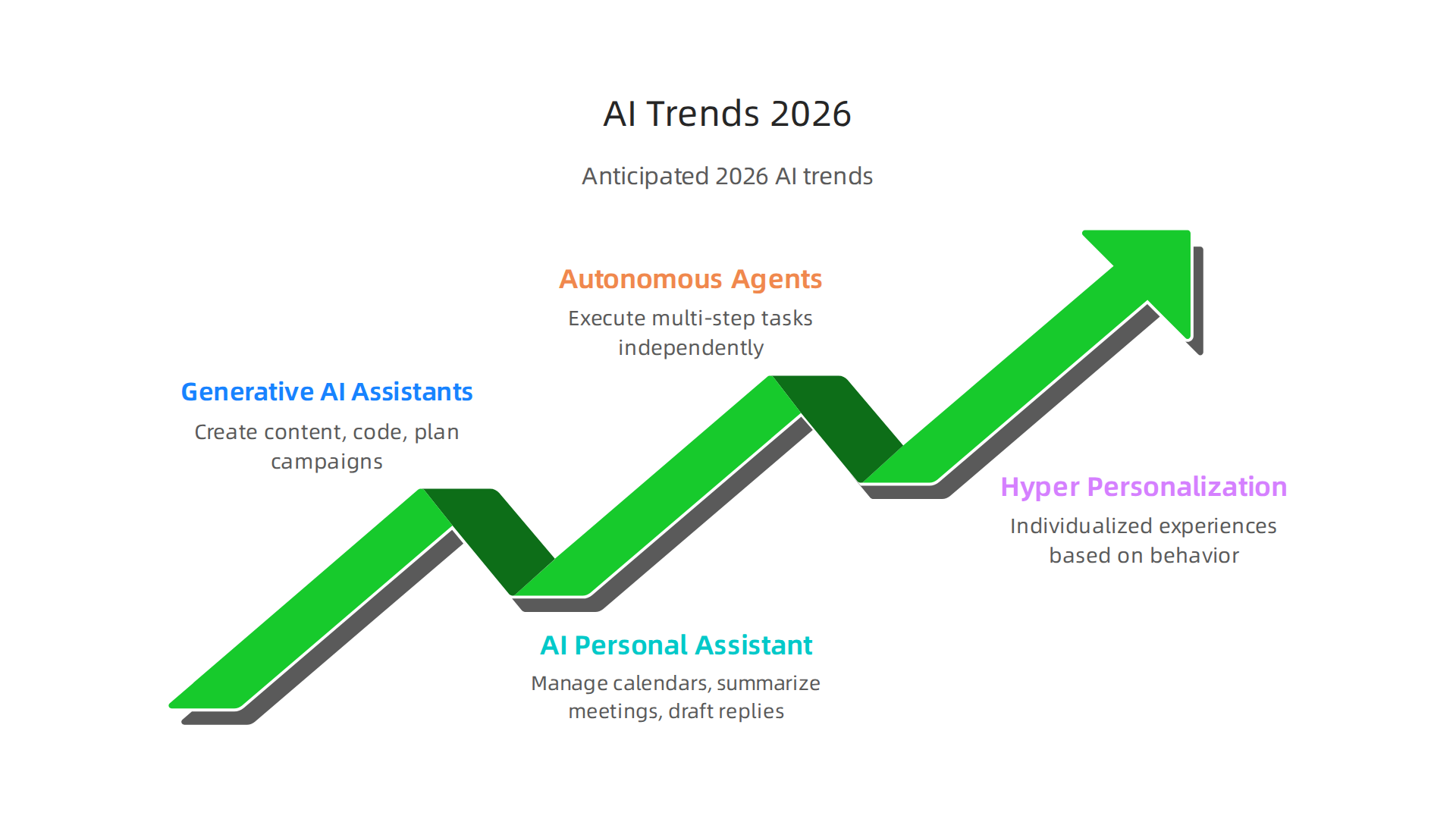
These are not just chatbots. They are AI systems that can work through multi-step tasks without you watching every move. For example, an agent could handle a customer complaint from start to finish: read the message, check the order history, issue a refund, and send a follow-up email. This saves your team hours each week.
Another trend is hyper-personalization. AI now looks at customer behavior, past purchases, and real-time clicks to offer a truly individual experience. This is not just for big companies. Small businesses can use these tools too. Platforms like HubSpot are adding hubspot ai features that make this easy. They help you send the right message at the right time without manual work.
So what does this mean for you as an entrepreneur or developer? You need to get ready for a world where AI is everywhere. It is not optional anymore. The top AI trends for 2026 show that businesses using AI see better efficiency and growth. According to a report by Forbes, 95% of executives believe that trust in AI will be critical for success in the coming year. You can read the full AI trends shaping business in 2026 article to see the data.
One practical step is to keep learning. The tools change fast. Taking business courses online can help you understand how to apply AI to your specific field. Also, look into hostinger ai website builder if you need a quick site with smart features. But the most important thing is to start small and experiment.
If you want to stay ahead of all these changes, you might want a daily source of clear AI news. The Deep View Newsletter gives you a quick update on what matters most. You can check out The AI Newsletter Worth Reading to get started.
Finally, if you are thinking about building your own AI-powered product, now is a great time. The tools are cheaper and easier than ever. Read about 9 AI startup ideas for 2026 to spark your next project.
The future is already here. The question is how fast you adapt.

Summary
This article explains how HubSpot’s Breeze AI platform (2026) transforms marketing, sales, and service by automating tasks, personalizing outreach, and surfacing actionable insights from your CRM. It covers the core Breeze components—Copilot, Agents, and Breeze Intelligence—and shows how Smart CRM features like Smart Properties and predictive lead scoring reduce manual data work. You’ll read practical examples for email marketing, sales prioritization, customer support automation, and analytics that help teams act faster and smarter. For developers the article details integration options—REST/GraphQL APIs, webhooks, OAuth 2.0 or Private App tokens, and custom code actions—plus reliability and security best practices. It also outlines how entrepreneurs can use AI to scale operations and highlights future trends like autonomous agents and hyper-personalization. After reading, you’ll know which HubSpot AI features to try first, how to integrate them safely, and how to measure impact for your business.