

Software Integration: Methods, Challenges, and Best Practices
Overview
Introduction
Software integration connects systems that need to exchange data or coordinate actions. It can be as direct as one application requesting a record from another, or as broad as a workflow that moves information through several services. The goal is to make those systems work together while preserving the behavior and reliability each depends on.
The right design depends on what must be shared, how quickly it is needed, how much data moves, and what happens when a dependency is unavailable. Before choosing a pattern, identify the systems involved, the data or actions that cross boundaries, and who owns each side. These details shape interface design, data handling, failure response, and the operational responsibility each team must accept. This guide explains common software integration methods, their trade-offs, a practical planning process, and the security, reliability, and maintenance concerns to account for when implementing them.
What software integration means
Software integration is the deliberate connection of applications, services, data stores, or workflows so they can exchange information or trigger actions. Simply installing two applications does not integrate them: each may continue operating independently, with no agreed way to share data or coordinate work.
The term covers several related needs:
- Data integration moves or synchronizes information between systems. Teams may need to align formats, identifiers, and update rules so the receiving system can use the data.
- Application or API integration lets one application request information or functionality from another through an interface, or receive information through a defined mechanism.
- Workflow or process integration coordinates steps across systems. An action in one application might cause another service to perform work, with the outcome passed along or recorded.
These categories can overlap. A workflow may call an API and then update a data store, for example. The integration itself may connect just two systems directly, often called point-to-point, or fit into a broader architecture that handles communication among many services. The number of systems is not the only design consideration: timing, data ownership, failure behavior, and the need to change one side without disrupting the other all matter.
Thinking about integration in these terms helps define the actual problem before selecting a method. Is the priority current data, a response to a user action, a large scheduled transfer, or coordination across a business process? The answer shapes the technical approach.
Common software integration methods
Integration methods differ in how they exchange information, how quickly updates become available, and how tightly the connected systems depend on one another.
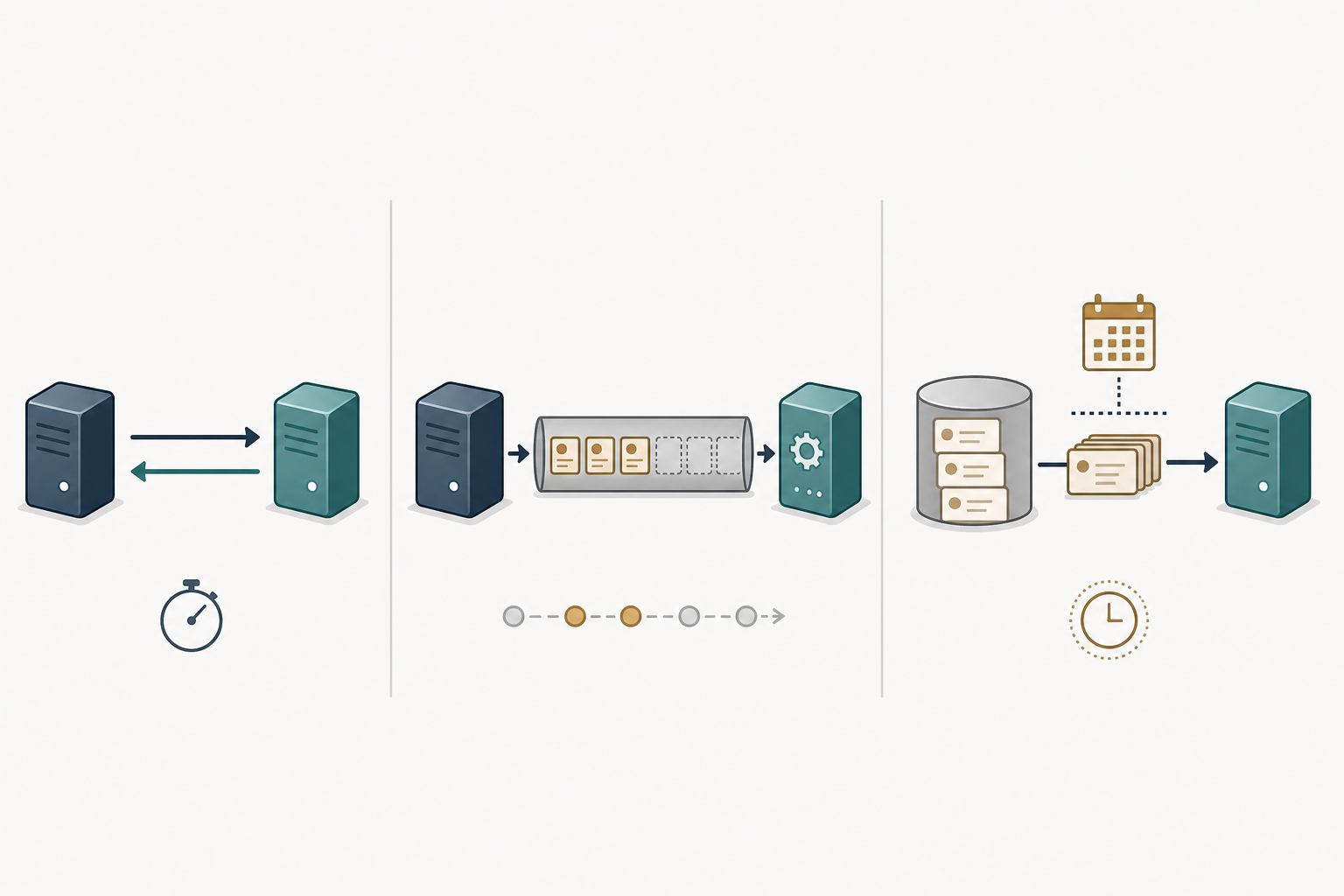
These patterns can also be combined.
Direct API and synchronous request-response. One system sends a request and waits for a response, commonly through an API. This suits interactions where a caller needs an immediate result and the exchange is relatively small. Synchronous communication can provide current values and quick back-and-forth, but it also makes the caller depend more directly on the responding system’s availability. Microsoft’s integration guidance describes these trade-offs; actual limits depend on the systems and design.
Asynchronous messaging and event-driven integration. A system can publish a message or event for another system to process, rather than requiring the caller to wait for the work to finish. Queues and publish-subscribe are common patterns. They can separate system availability and buffer work, and may support near-real-time reactions. They are not automatically immediate: queueing and processing can delay updates, so response timing and failure handling need to be designed. Microsoft’s pattern overview discusses these asynchronous approaches.
Batch transfer and ETL. Batch describes how records are grouped and transferred, often on a schedule. Grouping data can reduce repeated message traffic, but the trade-off is less freshness and, in some cases, a load spike when the receiving system processes a batch. Larger exchanges may use background jobs and a staging location. ETL is a data-processing workflow that extracts, transforms, and loads data, commonly for analytics or reporting; it is not the same thing as the batch transport pattern. An AWS example describes ETL for analytical LMS data, but its specific services are not requirements for other architectures.
Middleware or an integration platform. A shared layer can provide routing, transformation, orchestration, connectors, monitoring, logging, or notifications. This may be useful when several systems need common integration capabilities, but the platform also becomes something teams must configure and operate. Its presence does not guarantee lower complexity.
| Method | Typical fit | Main trade-off |
|---|---|---|
| Direct API, synchronous | Immediate, relatively small exchanges | Fast response, but tighter availability and dependency coupling |
| Messaging or events | Triggered work that can be processed asynchronously | Decoupling and buffering, with possible delivery or processing delay |
| Batch or ETL | Scheduled grouped transfers; ETL often supports analytics and reporting | Handles grouped movement, but data may be less fresh |
| Middleware or integration platform | Shared routing, transformation, orchestration, or connectors | Central capabilities, with additional platform operations to manage |
A practical process for planning and implementing an integration
Start with the outcome, not the technology. Identify the workflow, participating systems, data ownership, and required freshness. An immediate user response has different needs from a report that can run on a schedule. Microsoft’s integration guidance also highlights response timing, message volume, system independence, and batching as pattern-selection criteria Microsoft’s pattern guidance.
Next, map the system boundaries before choosing a method. Record available interfaces, data formats, authentication requirements, and how each side should handle failures. Define the fields to transfer, their mappings, and who resolves conflicting or invalid records. This makes assumptions visible while the design is still easy to change.
Build and test a small end-to-end path. Validate the data contract or schema, then test ordinary cases as well as timeouts, rejected data, unavailable dependencies, and duplicate delivery where relevant. Retry only when the failure and operation make repetition safe. For large scheduled data sets, Microsoft describes background jobs and staging locations such as blob storage as possible batch approaches, not universal requirements batch integration approaches.
Illustrative example: A support system sends new case details to an analytics destination each night. The team agrees which system owns case status, maps the fields, stages the transfer, and checks how invalid records are reported before scheduling the job.
Source systems → integration pattern or layer → destination systems
                         ↓
                monitoring and error handling
Include release and operations in the implementation plan. Decide how changes will be deployed, what signals indicate a failed or delayed transfer, where operators can find actionable errors, and who owns fixes. Document the interface, data assumptions, recovery steps, and responsible team. Monitoring and testing needs vary by architecture, so define them for the workflow rather than assuming one checklist fits every integration.
Common software integration challenges
Integration problems often begin with mismatched assumptions about data. Two systems may represent the same concept differently, require different fields, or change a schema without the other side being ready. Poorly defined ownership also makes it difficult to determine which value is authoritative when records disagree. Document field mappings, validation rules, and the process for coordinating interface changes.
Failures between services require deliberate handling. A timeout does not necessarily mean the destination did nothing: repeating a request could create a duplicate side effect. Decide whether each operation can safely be repeated, and use stable identifiers or other duplicate safeguards where the delivery model calls for them. Microsoft advises that retries depend on fault type and operation semantics; attempts and total duration should be bounded to avoid prolonging work or contributing to a retry storm (retry guidance, retry storm risks). Timeout budgets also need to work with retry behavior and the operation’s latency requirements (transient-fault guidance). Rate limits and partial outages can further affect processing, so define what to defer, reject, or surface for human attention rather than retrying indefinitely.
Security is another boundary to design explicitly. Authentication verifies identity; authorization determines which objects, fields, and operations that identity may access. OWASP’s API Security Top 10 identifies authorization failures, broken authentication, excessive resource consumption, and unsafe consumption of APIs among its risks. These are risk categories to assess, not a claim that every integration faces each one (OWASP API Security Top 10).
Treat external services as dependencies, not automatically trusted components. OWASP recommends secure transport and validation of data received from integrated APIs. For HTTP clients, it also warns that blindly following a redirect and resending a request can expose sensitive data to an attacker-controlled destination; control redirects where applicable (OWASP guidance on unsafe API consumption). Protect credentials with least-privilege access and fine-grained controls, and consider short-lived or dynamic secrets where practical. OWASP discusses these as practices and options, not as a universal rotation interval or technology choice (secrets-management guidance).
Finally, tight coupling and undocumented dependencies can make a change in one system disruptive to another. Keep contracts and ownership clear, and make failure signals useful to the people responsible for recovery. The appropriate controls depend on the protocol, data sensitivity, and operation semantics.
Software integration best practices
Make the connection explicit before relying on it. Document the interface, data contract, expected inputs and outputs, and how changes will be versioned. Validate incoming data rather than assuming that a connected system always sends a correct or safe payload.
Also define what counts as a valid message and what should happen when validation fails: reject it, quarantine it, or route it for review according to the workflow. Keep examples of accepted payloads and contract changes alongside implementation notes, and test consumers against the versions they are expected to support. These checks make incompatible changes easier to detect before they disrupt dependent systems in production.
Treat every API connection as a security boundary. Use secure transport, restrict credentials and permissions to what the integration needs, and avoid sending or retaining unnecessary sensitive data. Authentication confirms identity; authorization must also determine which objects, fields, and operations that identity may access. The OWASP API Security Top 10 highlights authorization failures, broken authentication, resource abuse, and unsafe API consumption as risks to consider, not as proof that every risk applies equally to every system.
For credentials, follow least privilege and limit reuse. OWASP’s secrets-management guidance supports fine-grained access controls and short-lived or dynamic secrets where practical. The right mechanism depends on the systems involved; there is no universal rotation interval. When consuming third-party APIs, validate their responses and use secure communication. Control redirects where the protocol and client architecture allow it, so sensitive requests are not blindly resent to an unexpected destination.
Plan for dependency failures. Set timeouts that fit the operation and its overall latency budget. Retry only failures that are suitable for another attempt, cap attempts and total duration, and use delays appropriate to the dependency. As Microsoft’s retry guidance explains, repeating a non-idempotent operation can cause unintended side effects. Design operations that may be repeated to produce a safe outcome when possible; idempotency keys are not required in every context. Avoid unlimited retries, which can contribute to retry storms.
Add operational visibility into relevant requests, events, latency, and failures, while keeping sensitive values out of logs. Test normal flows, edge cases, and dependency failures, and assign an owner to review contract changes, credentials, alerts, and recovery behavior. Testing and observability details should be chosen for the system; the available guidance does not establish one complete standard for every integration.
How to choose the right integration approach
Start with the workflow, not a preferred technology. Ask whether a caller needs an immediate answer, how fresh the data must be, how much data moves, what triggers an exchange, and whether the systems can operate independently.
A direct synchronous API can suit a relatively small interaction that needs an immediate result, but it makes the caller more dependent on the availability and response time of the other system. Microsoft’s integration guidance describes this trade-off alongside the potential for more current values and smaller payloads. Asynchronous messaging can separate systems and buffer work, but it may delay responses or updates; design its processing and failure behavior rather than assuming the pattern handles failures automatically. Batch transfer can suit periodic, larger movements when lower freshness is acceptable.
Then assess the operational fit: payload and message volume, load distribution, security boundaries, failure tolerance, and the team’s ability to monitor and maintain the connection. A more decoupled pattern may add infrastructure and operational responsibilities; a direct connection may be simpler to reason about initially but tighter in its dependencies. The right balance depends on the systems and service requirements.
Quick decision checklist: data freshness; interaction or trigger pattern; payload and volume; coupling; security needs; failure tolerance; and clear operational ownership.
Choose the least complex approach that demonstrably meets these requirements, not simply the simplest approach in isolation. Revisit the design if the workload, latency needs, or failure expectations change.
Conclusion
Reliable software integration starts by matching the method to the workflow: how quickly information is needed, how much moves, and what happens when a dependency is unavailable. Before implementation, document the systems, data flows, access requirements, expected failure behavior, and the person or team responsible for upkeep.
After launch, test the integration under realistic conditions and monitor whether it behaves as intended. Review contracts, permissions, and operational assumptions when either connected system changes. A useful handoff also records how operators will detect stalled or incorrect exchanges, whom to contact, and what recovery action is appropriate. This makes ownership actionable rather than merely assigning a name. Treat the design as something to maintain, not a one-time connection, and adjust the approach when requirements evolve.
Summary
Software integration connects applications, services, data stores, and workflows to exchange information or coordinate actions. Learn how API, messaging, batch, and middleware patterns differ, and how to plan data contracts, security, failure handling, testing, and ongoing ownership.